RuneStorm
http://www.runestorm.com/forums/

Basic Ballistic Weapons coding tutorial.
http://www.runestorm.com/forums/viewtopic.php?f=27&t=55881
Page 1 of 2

Author:  Captain Xavious [ Wed Apr 16, 2008 6:11 pm ]
Post subject:  Basic Ballistic Weapons coding tutorial.

Attached should be a zip file containing the decompiled BCoreV21 and Ballisticv21 packages which you will need to put in your UT2004 folder. Next you will need to download UDE.

When you first open UDE, it may ask you if you want to associate something or other with it, just click yes and wait for it to do it's thing.

Next, look for the package browser and find the Ballisticv21 package, then right click on, say, the SAR-12 classes, then click Duplicate from the little menu that pops up from right clicking. Make a unique name for the package you want it in, click yes to making a new package, and then go from there.

A little word about the different classes for each weapon.

You will have a Weapon class, usually 2 firemode classes, an attachment class, a pickup class, sometimes a projectile class, an ammo type (in BW's case its often shared), and in the instance of BW, often somewhere between 2 and 6 damage types.

This is a lot of stuff right there, but let me break down what each does and it won't be as complex to you.

First off, the Weapon class. Often t is simply given the same name as the weapon itself. This what decides what fire modes it has, its recoil and chaos levels, its name in game, description, clip size, all sorts of stuff like that.

Fire modes are basically the things that happen when you press the left or right mouse button. For instant hit weapons, like the SAR-12, they control the damage and recoil from shot, the damage types, penetration amount, and knockback from hitting someone.

If its a projectile firing firemode (not instant hit) like the A73, then the fire mode will decide what projectile to use rather than damage or knockback.

The Projectile classes choose what the projectile will look like, its speed, damage, and knockback.

The attachment class basically controls how you and your weapon appear in third person.

Pickup class basically is used to configure how it looks on the ground as well as a pickup message.

Ammo classes just configure messages for picking up ammo, and max ammos and such. I think there's two different classes, one for ammo itself and one for ammo pickups, the though I may be wrong, can't remember off hand.

Damage types basically are used to choose what death messages to display as well as different gore effects and vehicle damage scaling and stuff.

That's the classes in a nut shell. I'll cover more on this later, but for starter's I recommend duplicating all the classes from one of the simpler guns like the SAR and just tweaking the fire mode class's default properties. Remember to change the names of the various classes that are referenced in the code.

Remember, default properties are the main thing you'll want to change around until you know what you're doing. They're easy to mess with and can leave very noticeable results with very little chance of error.

If you need more help, just post your questions in this thread.


http://www.4shared.com/file/141770680/8 ... _Code.html
http://www.4shared.com/file/141772561/c ... _Code.html
http://www.4shared.com/file/141771614/e ... _Code.html

Author:  bloodchain3824 [ Wed Apr 16, 2008 6:21 pm ]
Post subject:  Basic Ballistic Weapons coding tutorial.

wow this tutorial really is of big help.
thnx. no i can create new weapon projectiles
so cool

Author:  Sgt. Kelly [ Wed Apr 16, 2008 6:23 pm ]
Post subject:  Basic Ballistic Weapons coding tutorial.

A very useful windows batch file that compiles classes.

This is the sole file I used in making my UT2004 and Dues Ex mods.


All you have to do is plop it in your system folder, add the required Ballistic and BWCore.u's to the UT2004.ini, and press it. It converts all your .uc files (the things you changed) to .u files.

[br]File: [url=../../files/public/1208391811_105_FT55881_fixuccmake.zip]1208391811_105_FT55881_fixuccmake.zip[/url]

Author:  headhunter [ Tue Apr 22, 2008 10:28 pm ]
Post subject:  Basic Ballistic Weapons coding tutorial.

I tried opening UDE and there is an error message that says ut2004 is invalid, reinstalling the application can fix this problem or something like that.

Author:  Glosmostinex [ Sun Apr 27, 2008 2:00 pm ]
Post subject:  Basic Ballistic Weapons coding tutorial.

hmmm..
then I made a new package, Duplicated the M806 classes, edited them. I compile via UDE, and it says something about edit packages in ut2004.ini. what is the edit packages? I putted a line in the UT2004.ini a editpackages with my package. after compiling, it said that no errors ocurred, but I can't use the weapon I created in the game... why?

and I have a message in UDE...

The superclass of one of your classes couldn't be found. Check the class header of the second class for typos. If the superclass is in the same package also check its class header, if not check your ini files' EditPackages lines for missing packages.

Is this the error? %-6

Author:  Captain Xavious [ Mon Apr 28, 2008 5:31 am ]
Post subject:  Basic Ballistic Weapons coding tutorial.

Ah yes, that good old edit packages problem. What you need to do, is in the section for edit packages, ut inBCorev21, than underneath that put in Ballisticv21. These both should go above your package. The trick is to make sure you add in the edit package fo the .u file you are making children of (classes that extend classes from another package).

It should be in this order:

BcoreV21
BallisticV21
The bonus packs in any order if you plan to use them
Your package

Author:  Glosmostinex [ Mon Apr 28, 2008 6:56 pm ]
Post subject:  Basic Ballistic Weapons coding tutorial.

It worked!!!
(thanks!)

However I have a small problem.
I made a pistol based on the M806, but it does not have lasersights.

when I duplicated the classes, it had flashEmitter, secondaryFire, and sightLEDs. what is the difference between them?(i guess the sight LEDs are the small lights in the ironsights, no?)

Author:  Captain Xavious [ Wed Apr 30, 2008 4:47 am ]
Post subject:  Basic Ballistic Weapons coding tutorial.

Alright, flashemitter would be the muzzle flash of the gun when firing. Secondary fire, in this case, would be what turns the laser sight on, and sightLEDs would be as you correctly guessed.

Chances are, you have something referenced wrong for the laser sight. Check in the code for the weapon, the secondary fire, and the attachment classes for some reference to the older classes.

That is probably where the problem(s) lies. Those laser sights can be a bugger.

Author:  Glosmostinex [ Wed Apr 30, 2008 12:00 pm ]
Post subject:  Basic Ballistic Weapons coding tutorial.

It works now, i forgot to rename some M806 references !lol
Thanks again!

Author:  Captain Xavious [ Thu May 01, 2008 5:11 am ]
Post subject:  Basic Ballistic Weapons coding tutorial.

Yep, no problem. :)

References is often the worst part. Its easy to over look them and there's often a lot of them.

Author:  fische11 [ Mon Jul 21, 2008 6:28 pm ]
Post subject:  Basic Ballistic Weapons coding tutorial.

I edited the damage of the D9 but i can`t compile the scipt.
After a short time ucc crashes and the error is:

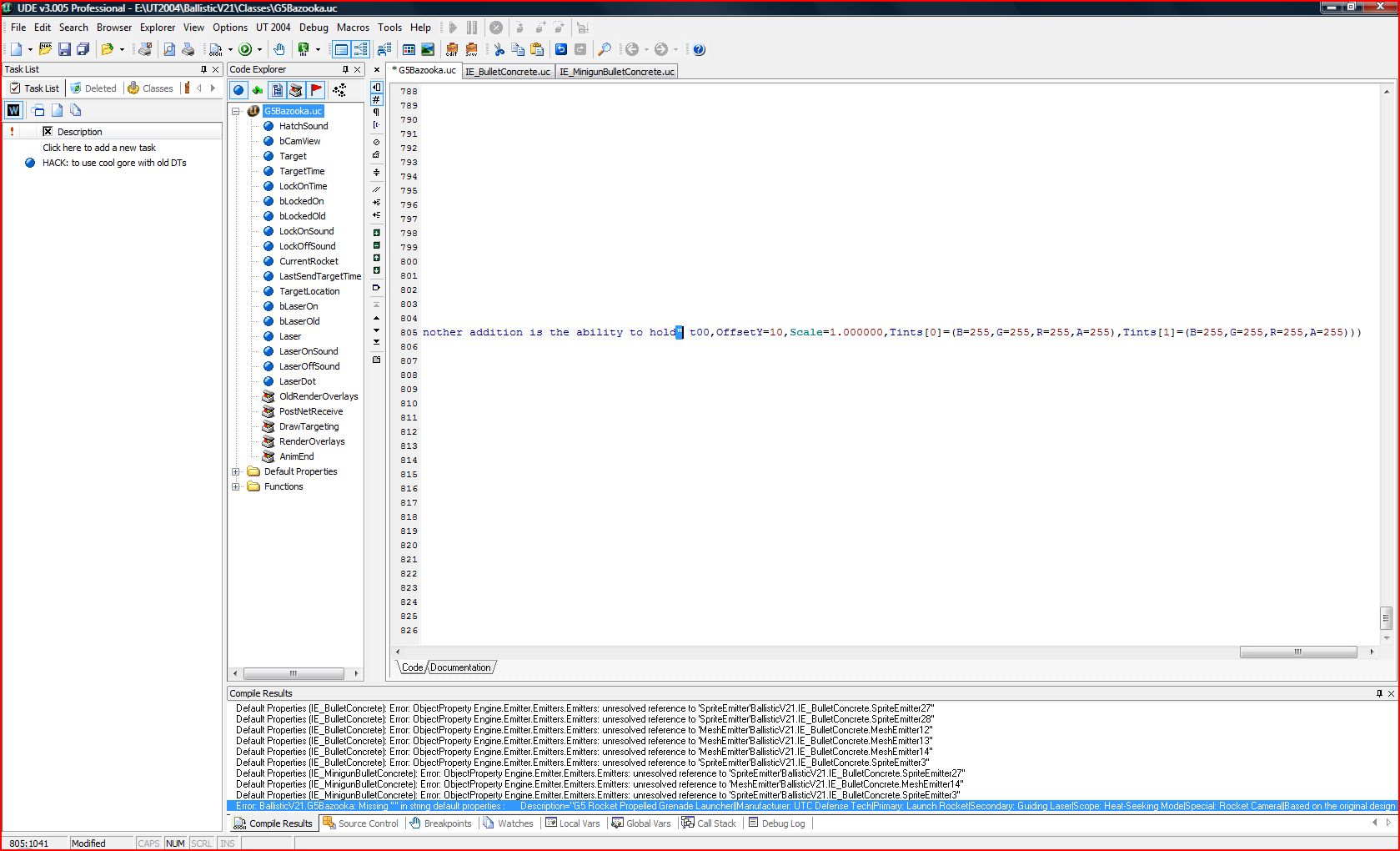
Log: Importing Defaults for G5Bazooka
Error: BallisticV21.G5Bazooka: Missing '"' in string default properties : Description="G5 Rocket Propelled Grenade Launcher||Manufacturer: UTC Defense Tech|Primary: Launch Rocket|Secondary: Guiding Laser|Scope: Heat-Seeking Mode|Special: Rocket Camera||Based on the original design by the legendary maniac Pirate, Var Dehidra, the G5 has undergone many alterations to become what it is today. The original bandit version was constructed by Var Dehidra to blast open armored cash transportation vehicles. Its name is derived from one of Dehidra's favourite targets, the G5 CTV 4x. It is now a very deadly weapon, used to destroy everything from tanks and structures to Skrith hordes and aircraft. The bombardement attack is a recent addition, replacing the original, primitive heat seeking function that caused it to target CTVs or backfire on the pirates' own craft, provided mainly for use in outdoor environments to destroy all manner of moving targets. The latest model also features a laser-painter device, allowing

I would be very happy when someone could help me :)

Author:  Captain Xavious [ Mon Jul 21, 2008 7:37 pm ]
Post subject:  Basic Ballistic Weapons coding tutorial.

Righto. Looks like the UC's weren't properly exported. Or just make sure that there is a " at the end of the discription text for the G5.

Author:  fische11 [ Tue Jul 22, 2008 4:30 am ]
Post subject:  Basic Ballistic Weapons coding tutorial.

Now i added the " at the end of the Discription but there is the same error.
But normaly the decompiled scripts that i can download here should be ok, or not ?
Maybe I made some mistakes by the compiling.
I go up to the menu "UT2004" then Compile scripts and then I tick on "BallisticV21" and "BCoreV21" and press "Compile". Maybe i make
I have taken a picture of UDE and the Errors.
http://www.abload.de/img/ued_errorl1o.jpg
Thx for your help

Author:  Sgt. Kelly [ Tue Jul 22, 2008 10:24 am ]
Post subject:  Basic Ballistic Weapons coding tutorial.

Export using the Unreal Editor.

It comes with less errors that way.

Author:  fische11 [ Tue Jul 22, 2008 10:29 am ]
Post subject:  Basic Ballistic Weapons coding tutorial.

Thank you very much I will try it :)

Author:  fische11 [ Tue Jul 22, 2008 11:18 am ]
Post subject:  Basic Ballistic Weapons coding tutorial.

Now I exported with Unrealed but I have got the same problem. I tried it 5 times but it doesnt work.
Do you have these proper scripts that work?

Author:  Captain Xavious [ Tue Jul 22, 2008 5:46 pm ]
Post subject:  Basic Ballistic Weapons coding tutorial.

Now each of the five times you tried compiling it, you attempted to fix the problem, I assume?

And as for the description, you put the " at the wrong spot, its supposed to go after the numbers and ) on that line.

And the files that are available on this page should be perfectly fine to use for compiling.

Author:  fische11 [ Wed Jul 23, 2008 6:11 am ]
Post subject:  Basic Ballistic Weapons coding tutorial.

Now it works!!!
Thank you very much for your help!!
But when i mount the M353 MG the game always crashes. I modified nothing at the scrip.
It is not so important to solve this problem but maybe it is just an easy error.
Error:
"
UT2004 Build UT2004_Build_[2005-11-23_16.22]

OS: Windows NT 6.0 (Build: 6001)
CPU: GenuineIntel PentiumPro-class processor @ 2667 MHz with 4093MB RAM
Video: NVIDIA GeForce 9800 GX2 (7516)

Assertion failed: Alpha >= 0 && Alpha <= 1 [File:.\UnMath.cpp] [Line: 537]

History: FInterpCurve::Eval <- UObject::execInterpCurveEval <- UObject::ProcessEvent <- (M353Machinegun_TW DM-1on1-Albatross.M353Machinegun_TW, Function BCoreV21.BallisticWeapon.WeaponTick) <- AActor::Tick <- TickAllActors <- ULevel::Tick <- (NetMode=0) <- TickLevel <- UGameEngine::Tick <- Level Albatross <- UpdateWorld <- MainLoop <- FMallocWindows::Free <- FMallocWindows::Realloc <- 10910191 0 FArray <- FArray::Realloc <- 0*2 <- FMallocWindows::Free
"

Author:  Captain Xavious [ Wed Jul 23, 2008 5:44 pm ]
Post subject:  Basic Ballistic Weapons coding tutorial.

Hmm... not sure on that one...

Author:  Glosmostinex [ Wed Jul 23, 2008 7:01 pm ]
Post subject:  Basic Ballistic Weapons coding tutorial.

Kaboodles or OCAdam had this problem in their mods,no? they solved it I think.

Author:  Kaboodles [ Wed Jul 23, 2008 8:07 pm ]
Post subject:  Basic Ballistic Weapons coding tutorial.

Yes. Fix the M353Machinegun.uc RecoilXCurve and RecoilYCurve values.

Author:  fische11 [ Fri Jul 25, 2008 1:17 pm ]
Post subject:  Basic Ballistic Weapons coding tutorial.

Ok Thank you very much, you all helped me very much :)
But what should i fix there?
"
RecoilXCurve=(Points=(,(InVal=0.200000,OutVal=-0.100000),(InVal=0.300000,OutVal=-0.200000),(InVal=1.000000,OutVal=-0.300000)))
RecoilYCurve=(Points=(,(InVal=0.300000,OutVal=0.500000),(InVal=1.000000,OutVal=1.000000)))
"

Edit:
Ok, you only have to delet this string in M353Machinegun_TW
"
RecoilXCurve=(Points=(,(InVal=0.000000,OutVal=0.600000),(InVal=1.000000,OutVal=1.000000)))
"

Author:  Mr.Cube [ Thu Jul 31, 2008 6:27 am ]
Post subject:  Basic Ballistic Weapons coding tutorial.

Cool everything works fine but where is the damage for the RX22?

Author:  Captain Xavious [ Thu Jul 31, 2008 7:56 pm ]
Post subject:  Basic Ballistic Weapons coding tutorial.

Well, thats handled a bit differently. I don't now exactly off hand, but perhaps look into a cloud or gas management labeled file thingy. I think its got something like that. It's a pretty complex weapon, I never really looked into it much yet.

Alright, did some snooping, take a look at the RX22AActorFire file.

Author:  {ABA}Bonjaa [ Thu Mar 12, 2009 7:28 pm ]
Post subject:  Basic Ballistic Weapons coding tutorial.

Hey guys: I realize that this is an older post and might not get some feed back. But I am wondering about something. I can not seem to get UDE to recognize that I have a ut2004 game in the folder that I am telling it where it is. It will not load the UDE and says to load up the game to the folder. Strange, tried it a number of times and still no go. So I do have Notepad ++ (which UDE to me when viewing a snapshot, seems like a glorified Notepad ++) and I can see where to alter the default properties in the .uc files of the download that was first posted. Can this be done this way? If so, how do I change it to be recognized to .u files and than how do I make it to work as a new BallisticV21(I am assuming that it changes this folder)? How would I get it to work on a server properly?

Author:  biiibjjjjiiiiii [ Sat Oct 17, 2009 11:22 pm ]
Post subject:  Re: Basic Ballistic Weapons coding tutorial.

umm i have a stupid question , where would i get the files you were talking about in the tut. when i see the link i only see source / code of fourm not actual link like i see [url]......ect.......[url]
any chance i could find the things you were talking about. if its right infront of me sorry i didnt look very hard

Author:  Captain Xavious [ Sun Oct 18, 2009 1:27 pm ]
Post subject:  Re: Basic Ballistic Weapons coding tutorial.

Oops, sorry about that man, forgot to fix it after the forum switch. Should be good now.

Author:  biiibjjjjiiiiii [ Sun Oct 18, 2009 10:00 pm ]
Post subject:  Re: Basic Ballistic Weapons coding tutorial.

thanks alot. should be interesting

Nice tut and quick replying :D

Author:  Yokelassence3 [ Sun May 29, 2011 1:05 am ]
Post subject:  Re: Basic Ballistic Weapons coding tutorial.

Pardon my epic 2 year bump, but I have been looking up UDE and I found plenty of reports telling me that it is no good for UT2004 modding or is simply out of date

There is an alternative called WOTgreal which claims to have UT2004 support

I am a bit confused here, which IDE is better?

Author:  Captain Xavious [ Sun May 29, 2011 9:52 pm ]
Post subject:  Re: Basic Ballistic Weapons coding tutorial.

I still use UDE. Only problem I have with it is I may need to delete the .u package you are trying to compile before compiling it usually because it likes to say it can't find some class called in code that it has no business not finding.

Page 1 of 2 All times are UTC - 6 hours
Powered by phpBB © 2000, 2002, 2005, 2007 phpBB Group
http://www.phpbb.com/