Really great that you make a tutorial Xavious!

| RuneStorm http://www.runestorm.com/forums/ |
|
| Basic Ballistic Weapons coding tutorial http://www.runestorm.com/forums/viewtopic.php?f=74&t=74641 |
Page 1 of 1 |
| Author: | Captain Xavious [ Wed Jun 04, 2008 12:19 pm ] |
| Post subject: | Basic Ballistic Weapons coding tutorial |
Attached should be a zip file containing the decompiled BCoreV21 and Ballisticv21 packages which you will need to put in your UT2004 folder. Next you will need to download UDE. When you first open UDE, it may ask you if you want to associate something or other with it, just click yes and wait for it to do it's thing. Next, look for the package browser and find the Ballisticv21 package, then right click on, say, the SAR-12 classes, then click Duplicate from the little menu that pops up from right clicking. Make a unique name for the package you want it in, click yes to making a new package, and then go from there. A little word about the different classes for each weapon. You will have a Weapon class, usually 2 firemode classes, an attachment class, a pickup class, sometimes a projectile class, an ammo type (in BW's case its often shared), and in the instance of BW, often somewhere between 2 and 6 damage types. This is a lot of stuff right there, but let me break down what each does and it won't be as complex to you. First off, the Weapon class. Often t is simply given the same name as the weapon itself. This what decides what fire modes it has, its recoil and chaos levels, its name in game, description, clip size, all sorts of stuff like that. Fire modes are basically the things that happen when you press the left or right mouse button. For instant hit weapons, like the SAR-12, they control the damage and recoil from shot, the damage types, penetration amount, and knockback from hitting someone. If its a projectile firing firemode (not instant hit) like the A73, then the fire mode will decide what projectile to use rather than damage or knockback. The Projectile classes choose what the projectile will look like, its speed, damage, and knockback. The attachment class basically controls how you and your weapon appear in third person. Pickup class basically is used to configure how it looks on the ground as well as a pickup message. Ammo classes just configure messages for picking up ammo, and max ammos and such. I think there's two different classes, one for ammo itself and one for ammo pickups, the though I may be wrong, can't remember off hand. Damage types basically are used to choose what death messages to display as well as different gore effects and vehicle damage scaling and stuff. That's the classes in a nut shell. I'll cover more on this later, but for starter's I recommend duplicating all the lasses from one of the simpler guns like the SAR and just tweaking the fire mode class's default properties. Remember to change the names of the various classes that are referenced in the code. Remember, default properties are the main thing you'll want to change around until you know what you''re doing. They're easy to mess with and can leave very noticeable results. If you need more help, just post your questions in this thread. |
|
| Author: | SHAD0Wdump [ Wed Jun 04, 2008 2:51 pm ] |
| Post subject: | Re: Basic Ballistic Weapons coding tutorial |
It seems I can't even find this package browser. |
|
| Author: | Kien [ Wed Jun 04, 2008 2:59 pm ] |
| Post subject: | Re: Basic Ballistic Weapons coding tutorial |
Really great that you make a tutorial Xavious!
|
|
| Author: | OCAdam [ Wed Jun 04, 2008 4:01 pm ] |
| Post subject: | Re: Basic Ballistic Weapons coding tutorial |
SHAD0Wdump wrote: It seems I can't even find this package browser. It's on the left hand side of the window. If you don't see it, then go /*opens UDE to get it right*/ to the View menu at the very top center, and then click on Packages. Then you should be able to see that package list thingy. |
|
| Author: | SHAD0Wdump [ Wed Jun 04, 2008 4:40 pm ] |
| Post subject: | Re: Basic Ballistic Weapons coding tutorial |
Thats what I thought it was,but the buttons do not respond to anything.(so far) |
|
| Author: | OCAdam [ Wed Jun 04, 2008 7:37 pm ] |
| Post subject: | Re: Basic Ballistic Weapons coding tutorial |
You have to actually double click the folders to open them, and then double click the UC file to open it and view it. I hope you get to understand the program soon! |
|
| Author: | SHAD0Wdump [ Thu Jun 05, 2008 2:58 pm ] |
| Post subject: | Re: Basic Ballistic Weapons coding tutorial |
I have a feeling this is gonna take a while,I double click the box labeled packages,I double click the tab labeled packages in the new box that pops up,now I have a bunch of completely unresponsive icons that do absolutely nadda when I click them,now what? |
|
| Author: | OCAdam [ Thu Jun 05, 2008 3:19 pm ] |
| Post subject: | Re: Basic Ballistic Weapons coding tutorial |
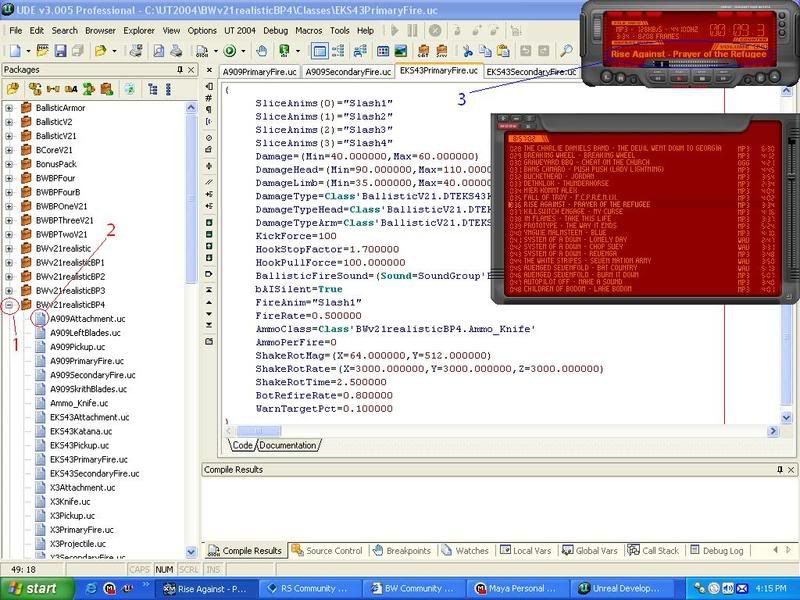 1. Click this to open up the package further. 2. Double click these to open the UC file themselves. 3. My music. This is XMPlay. ^^ |
|
| Author: | SHAD0Wdump [ Thu Jun 05, 2008 4:11 pm ] |
| Post subject: | Re: Basic Ballistic Weapons coding tutorial |
Oh... I don't have any of those class folders in the selection tray(or whatever you call it) Well I have found a separate way to do it,by using file/open... Thanks for you patience,I was just frustrating matters. It is too bad that packages thing just doesn't want to work for me,probably damn vista again. Btw,nice playlist. 
|
|
| Author: | OCAdam [ Thu Jun 05, 2008 6:11 pm ] |
| Post subject: | Re: Basic Ballistic Weapons coding tutorial |
You should be able to find the packages option under the Explorer menu I think. It'll be the first thing you can access on the list is what I perfectly remember. Or was it under Browser or View? Either way, first one on the list. |
|
| Author: | Kaboodles [ Thu Jun 05, 2008 7:51 pm ] |
| Post subject: | Re: Basic Ballistic Weapons coding tutorial |
SHAD0Wdump wrote: Oh... I don't have any of those class folders in the selection tray(or whatever you call it) In order to get them to show up, you need your .uc classes in a UT2004\PackageName\Classes folder.
Well I have found a separate way to do it,by using file/open... Thanks for you patience,I was just frustrating matters. It is too bad that packages thing just doesn't want to work for me,probably damn vista again. Btw,nice playlist. |
|
| Author: | SHAD0Wdump [ Thu Jun 05, 2008 11:36 pm ] |
| Post subject: | Re: Basic Ballistic Weapons coding tutorial |
Nadda,still a empty box. |
|
| Author: | Dumorah [ Sun Sep 21, 2008 9:01 am ] |
| Post subject: | Re: Basic Ballistic Weapons coding tutorial |
Wow sweet tutorial! I'm gonna try making a few weapons and see how they turn out. My only problem now is if i do make something then i'll have to find someone who can make a modle, animations, and textures =/ Oh yes and one other thing, how do we compile the classes so that it'll be playable in UT? I've added a modified SAR rifle and i've also added the word test to the description of the SAR to see if the compiler works but so far nothing has been added or changed to ballistics =/ The UDE program is located in C:\UT2004\System\UDE and the class folders are located in C:\UT2004 If you notice anything that i am doing wrong let me know |
|
| Author: | Samuel1957 [ Sun Oct 26, 2008 12:32 pm ] |
| Post subject: | Re: Basic Ballistic Weapons coding tutorial |
I seem to be having a problem getting this UDE to work. I've got the two BW things in my UT2004 Folder. But the UDE folder only contains a notepad file full of gibberish I cannot understand. I've re-read all these posts but don't see anything about this. Help please? Thanks in advance. |
|
| Author: | Captain Xavious [ Mon Oct 27, 2008 7:48 am ] |
| Post subject: | Re: Basic Ballistic Weapons coding tutorial |
Hmm... UDE seems to be very troublesome... I'll see if I can find an alternative. |
|
| Author: | Black Eagle [ Wed Oct 29, 2008 2:59 am ] |
| Post subject: | Re: Basic Ballistic Weapons coding tutorial |
Well first you'll have to export all scripts from Unreal Ed(if you don't already have the .UC files under your ut directory), it would be best to either download the UT's.UC files, and also the BW ones. in the actor browser got to file export all scripts.. then get into ude and goto 'UT 2004' and click on 'Refresh Package List'.. thats about all there is too it.. make sure you clean up your workspace too.. no faffy UDE windows, it should look just like OC's.. |
|
| Author: | OCAdam [ Wed Oct 29, 2008 5:25 am ] |
| Post subject: | Re: Basic Ballistic Weapons coding tutorial |
Well, probably not my current one! My XP looks like Windows 98 now! I turned off a lotta start programs to get this thing to run faster on games, so I didn't care too much to lose some looks on the OS for that.
|
|
| Author: | Tom10320 [ Mon May 11, 2009 10:22 am ] |
| Post subject: | Re: Basic Ballistic Weapons coding tutorial |
This is a bit of a late addition, but there was one BW coding question that even my old coder friend couldn't answer - how do you modify the position a weapon goes to when you sprint ? The weapon aims off slightly and I was wondering how to change it to a more...realistic position like the m295 or the railgun. I always wanted to know how to change stuff but hey, I just make the models. Oh, and by the way, if anyone at all knows how to integrate some 3rd-person animations for reloading etc. please can you let me know? I am making some but have absolutely no idea on how to get the bots (or me - romulus yo) to use them in game. Is it even possible? |
|
| Author: | Sergeant Kelly [ Mon May 11, 2009 3:24 pm ] |
| Post subject: | Re: Basic Ballistic Weapons coding tutorial |
Using SpringOffset in the default properties will get the job done. SprintOffSet=(Pitch=-6000,Yaw=-8000) Those are the ones from the SM-AT/AA Recoilless Rifle. |
|
| Author: | Captain Xavious [ Mon May 11, 2009 6:41 pm ] |
| Post subject: | Re: Basic Ballistic Weapons coding tutorial |
Whoa, you mean you're going to make third person animations for BW?! Thats awesome! Unfortunately, I'm not sure how you'd implement them, but I'm thinking some changes to the code would be required. Fortunately, a new BW patch is being planned, and with any luck we could slip your animations into it. I don't know what to tell you right now though, regarding implementation. 
|
|
| Author: | Tom10320 [ Fri May 15, 2009 12:17 pm ] |
| Post subject: | Re: Basic Ballistic Weapons coding tutorial |
Thank you for the awesome, captain. As I get more into the project and recieve some kind of word about implementation I will post a new thread. Until then I'll be here in the unlikely event that you need me. Sergeant Kelly: thanks for confirming that about sprintoffset - however, is there a reason nothing happens when I decompile from UnrealEd, edit the SRS-900 file in the BWPThreeV21 folder with ude, and then recompile with ucc? Am I just a n00b or is there something I am doing wrong? I love your weapons, by the way. Keep makin' 'em!
|
|
| Author: | Sergeant Kelly [ Sat May 16, 2009 12:56 pm ] |
| Post subject: | Re: Basic Ballistic Weapons coding tutorial |
Hm, you might need to recompile it as a new package. Like BWBPBallisticWeaponsModified or something. |
|
| Author: | BurnerMeen [ Sat May 23, 2009 10:33 pm ] |
| Post subject: | Re: Basic Ballistic Weapons coding tutorial |
Is there some way to get a .zip version of UDE? 'cause i got windows and windows doesn't do .ut4mod |
|
| Author: | Black Eagle [ Mon May 25, 2009 4:12 am ] |
| Post subject: | Re: Basic Ballistic Weapons coding tutorial |
Tom10320 wrote: Oh, and by the way, if anyone at all knows how to integrate some 3rd-person animations for reloading etc. please can you let me know? I am making some but have absolutely no idea on how to get the bots (or me - romulus yo) to use them in game. Is it even possible? It's very possible..  You will need your own 'Pawn' class first, then you will have to run your anims in there.. Not sure how you would implement a new pawn class using a mutator, or how it's runs the anims, but it shouldn't be too hard..  And way to go if you do decide make them.. 
|
|
| Author: | Tom10320 [ Tue May 26, 2009 3:05 am ] |
| Post subject: | Re: Basic Ballistic Weapons coding tutorial |
Yes I am making them, but wow. Not a coder myself, but what I think that meant was there needs to be a new pawn actor class that can run my anims as well as the standard ballistic features?  Erm, I'll get back to the Coach Gun. I'm having enough problems getting it to break open as it is! |
|
| Page 1 of 1 | All times are UTC - 6 hours |
| Powered by phpBB © 2000, 2002, 2005, 2007 phpBB Group http://www.phpbb.com/ |
|